> ## Documentation Index
> Fetch the complete documentation index at: https://docs.raven.dev/llms.txt
> Use this file to discover all available pages before exploring further.
# SMS Template
You can create an SMS template while creating an Event with SMS enabled. You can
easily create/update the template content by editing the event.
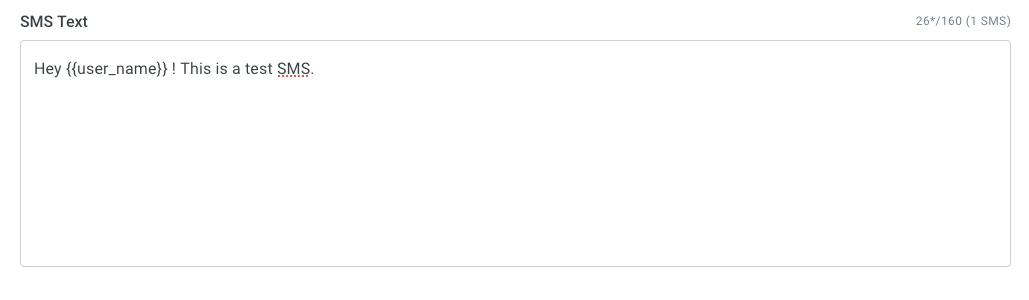 An SMS message is a simple plain text message. The character limit for a single
SMS message is 160 characters. When you send a SMS message over 160 characters,
the message will be split into segments of 153. For example, a 161-character
message will be sent as two messages, one with 153 characters and the second
with 8 characters. The recipient's device will then rebuild the messages and
show as one.
If you include
[non-GSM characters](https://www.twilio.com/docs/glossary/what-is-gsm-7-character-encoding),
such as (Hindi, Greek, Korean or Arabic etc), in SMS messages, Raven will send
those messages with Unicode encoding. Such messages are limited to 70 characters
and > 70 characters will be concatenated into 67 character message segments.
For SMS sent in India, the templates need to be registered on any of the DLT
platforms. You should add the registered DLT Template ID in the SMS template.
### Dynamic Content
To pass dynamic or custom data in the SMS template like invoice number, user
name, tracking link etc., you should wrap it within
[handlebars {{ user_name }}](https://handlebarsjs.com/guide/#what-is-handlebars).
Raven uses Handlebars.js to parse the template and all handlebar operations are
supported. Following Handlebars expressions are supported within templates:
1. Nested objects
2. \#if, #each, #with
You will need to pass the value of the variables in the data object of
[Send Event API](/api-reference/send-event).
**Example**
SMS Template:
```md theme={null}
Hey {{user_name}}, Thank you for your Order Id #{{order.id}} of amount
{{order.amount}}. {{#if premium}} Glad to have you as our Premium customer.
{{/if}} data object in API:
```
```json theme={null}
...,
"data": {
"user_name": "Joe",
"order": {
"id": 123,
"amount": 745
},
"premium": true
}
```
### Additional fields
Apart from the SMS text, you can also send additional fields in the template.
This is useful if you want to override the "From"/"Sender ID"/"Header" that you
configured while setting up the integration.
| Field | Description |
| -------- | ---------------------------------------------------------------- |
| `sender` | Name of the message sender (same as "From"/"Sender ID"/"Header") |
***
This is how you can pass it in the [Send Event API](/api-reference/send-event).
Check the API doc for the complete request.
```json theme={null}
...,
"override" : {
...,
"sms" : {
"sender" : ""
}
}
```
An SMS message is a simple plain text message. The character limit for a single
SMS message is 160 characters. When you send a SMS message over 160 characters,
the message will be split into segments of 153. For example, a 161-character
message will be sent as two messages, one with 153 characters and the second
with 8 characters. The recipient's device will then rebuild the messages and
show as one.
If you include
[non-GSM characters](https://www.twilio.com/docs/glossary/what-is-gsm-7-character-encoding),
such as (Hindi, Greek, Korean or Arabic etc), in SMS messages, Raven will send
those messages with Unicode encoding. Such messages are limited to 70 characters
and > 70 characters will be concatenated into 67 character message segments.
For SMS sent in India, the templates need to be registered on any of the DLT
platforms. You should add the registered DLT Template ID in the SMS template.
### Dynamic Content
To pass dynamic or custom data in the SMS template like invoice number, user
name, tracking link etc., you should wrap it within
[handlebars {{ user_name }}](https://handlebarsjs.com/guide/#what-is-handlebars).
Raven uses Handlebars.js to parse the template and all handlebar operations are
supported. Following Handlebars expressions are supported within templates:
1. Nested objects
2. \#if, #each, #with
You will need to pass the value of the variables in the data object of
[Send Event API](/api-reference/send-event).
**Example**
SMS Template:
```md theme={null}
Hey {{user_name}}, Thank you for your Order Id #{{order.id}} of amount
{{order.amount}}. {{#if premium}} Glad to have you as our Premium customer.
{{/if}} data object in API:
```
```json theme={null}
...,
"data": {
"user_name": "Joe",
"order": {
"id": 123,
"amount": 745
},
"premium": true
}
```
### Additional fields
Apart from the SMS text, you can also send additional fields in the template.
This is useful if you want to override the "From"/"Sender ID"/"Header" that you
configured while setting up the integration.
| Field | Description |
| -------- | ---------------------------------------------------------------- |
| `sender` | Name of the message sender (same as "From"/"Sender ID"/"Header") |
***
This is how you can pass it in the [Send Event API](/api-reference/send-event).
Check the API doc for the complete request.
```json theme={null}
...,
"override" : {
...,
"sms" : {
"sender" : ""
}
}
```