> ## Documentation Index
> Fetch the complete documentation index at: https://docs.raven.dev/llms.txt
> Use this file to discover all available pages before exploring further.
# Logs & Metrics
## 📜 Logs
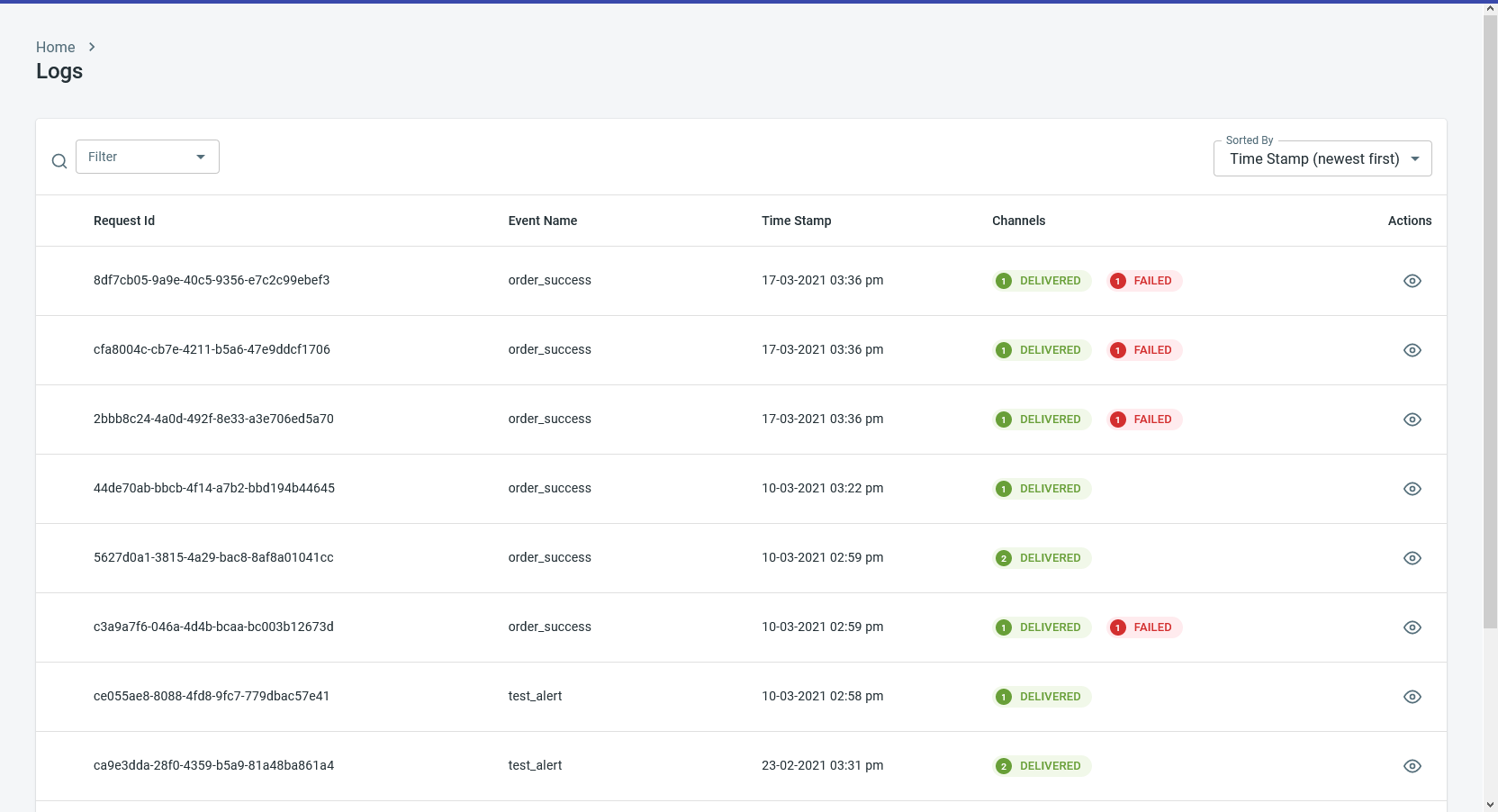
Every event that is sent to Raven is logged and can be viewed in the
[Logs section](https://console.ravenapp.dev/get-started). Since you can send
notifications on multiple channels in a single event, you will see the status of
each notification by clicking the Event log.
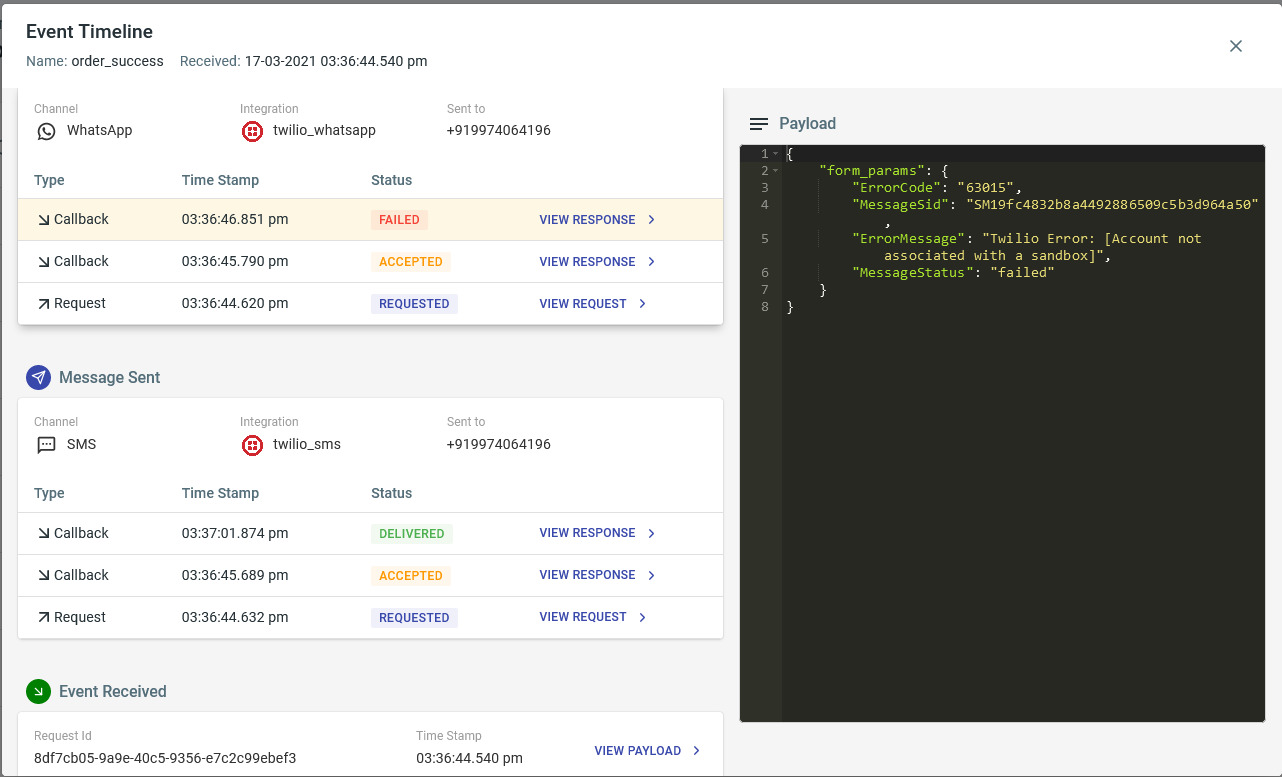
 On clicking an Event log, its timeline will be shown. The timeline displays each
notification, its status and the callbacks received from the provider. You can
also see the payload corresponding to each request/response.
On clicking an Event log, its timeline will be shown. The timeline displays each
notification, its status and the callbacks received from the provider. You can
also see the payload corresponding to each request/response.
 ### List of Statuses
Following are the list of statuses that are shown in the logs:
| Status | Desc | Channels |
| ----------- | --------------------------------------------------- | ------------------ |
| `QUEUED` | Requested queued in Raven | Default use Twilio |
| `REQUESTED` | Raven has sent the request to the provider | All |
| `ACCEPTED` | Provider has accepted the request | All |
| `DELIVERED` | Notification is delivered | All |
| `FAILED` | Provider API failed, Notification failed to deliver | All |
| `ERROR` | Error in the request sent to Raven | All |
| `READ` | Notification read | WhatsApp |
| `CLICKED` | Notification clicked | Email, Push |
| `OPENED` | Notification opened | Email |
| `DISPLAYED` | Notification shown in UI | Push |
***
### Advanced
You can reach out to us at [support@ravenapp.dev](mailto:support@ravenapp.dev)
if you need any of the following:
* A list of downloadable logs (of all notifications with their statuses) for a
time period.
* If you do not wish Raven to log the payload data, we will disable logging for
your app/account. Alternatively, if you have critical data in the payload like
OTP, you can mask that information for Viewer and Editor roles. Check out our
[Security](https://console.ravenapp.dev/get-started) doc for more details.
## 📈 Metrics
### List of Statuses
Following are the list of statuses that are shown in the logs:
| Status | Desc | Channels |
| ----------- | --------------------------------------------------- | ------------------ |
| `QUEUED` | Requested queued in Raven | Default use Twilio |
| `REQUESTED` | Raven has sent the request to the provider | All |
| `ACCEPTED` | Provider has accepted the request | All |
| `DELIVERED` | Notification is delivered | All |
| `FAILED` | Provider API failed, Notification failed to deliver | All |
| `ERROR` | Error in the request sent to Raven | All |
| `READ` | Notification read | WhatsApp |
| `CLICKED` | Notification clicked | Email, Push |
| `OPENED` | Notification opened | Email |
| `DISPLAYED` | Notification shown in UI | Push |
***
### Advanced
You can reach out to us at [support@ravenapp.dev](mailto:support@ravenapp.dev)
if you need any of the following:
* A list of downloadable logs (of all notifications with their statuses) for a
time period.
* If you do not wish Raven to log the payload data, we will disable logging for
your app/account. Alternatively, if you have critical data in the payload like
OTP, you can mask that information for Viewer and Editor roles. Check out our
[Security](https://console.ravenapp.dev/get-started) doc for more details.
## 📈 Metrics
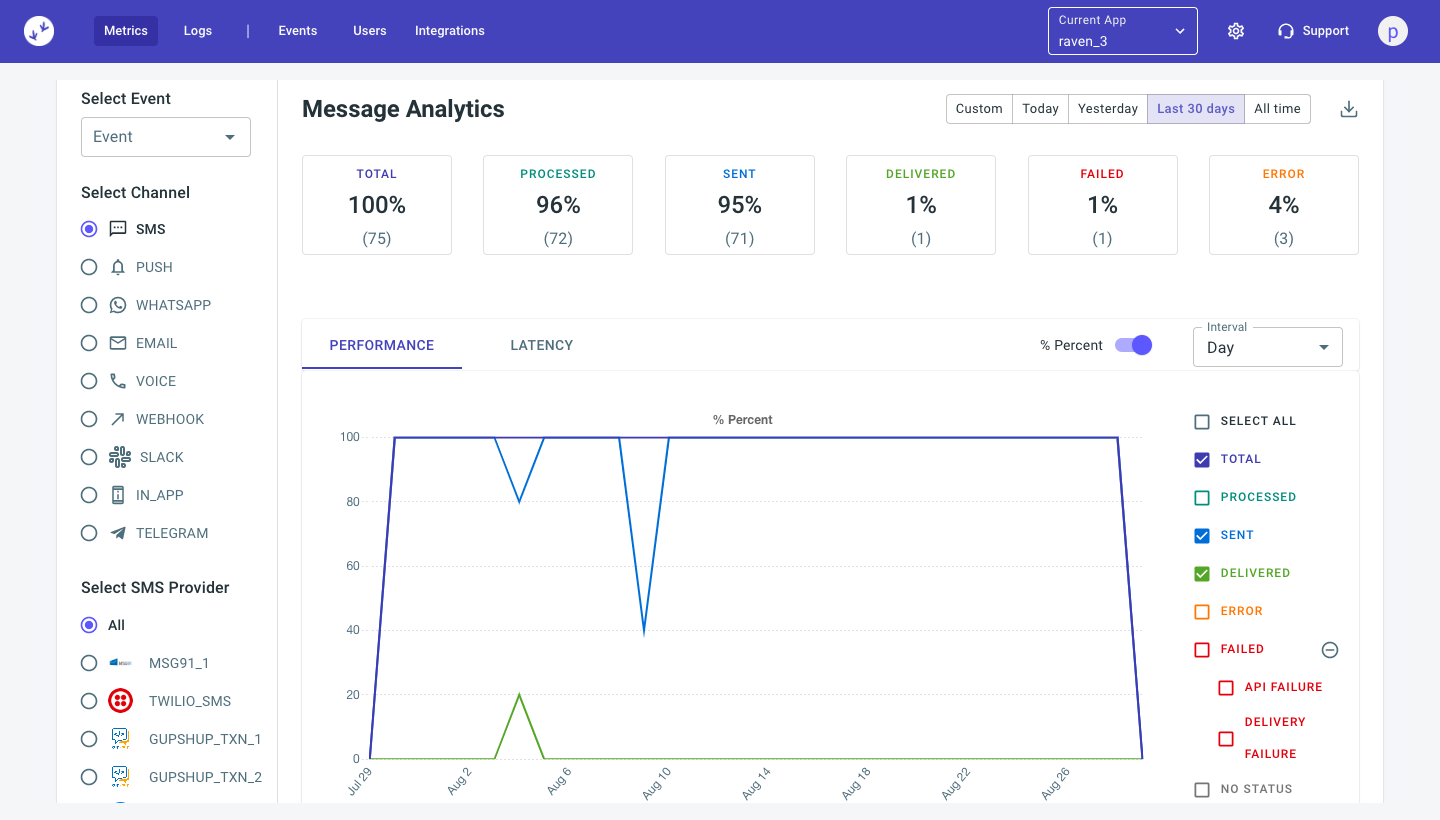 You can check all your events performance across all channels in the
[Metrics section](https://console.ravenapp.dev/get-started) You can apply
different filters to get the desired analytics. You can filter basis the Event,
Channel , Provider over a selected period of time and interval. You can even
download the aggregate metrics in CSV format for all channels.
### Top Stats
You can see both in count and % breakup of every status of the notifications.
You can check all your events performance across all channels in the
[Metrics section](https://console.ravenapp.dev/get-started) You can apply
different filters to get the desired analytics. You can filter basis the Event,
Channel , Provider over a selected period of time and interval. You can even
download the aggregate metrics in CSV format for all channels.
### Top Stats
You can see both in count and % breakup of every status of the notifications.
 **Total**: Total notifications that were requested to be sent.
**Processed**: Number of notifications processed successfully by Raven.This
means Raven was able to send the message to the specified recipient and with the
configured integration.
**Sent**: These are the notifications that were successfully sent to the
integration.This means Raven received a 200 OK response from the integration
provider for the request.
**Delivered**: These are the notifications that were successfully delivered to
the user.This is measured by mapping the delivered callback responses from the
integration provider.
**API Failure**: These are the notifications that Raven tried sending to the
integration provider but received an API Failure. This can be due to their API
timing out, or 4xx/5xx response from the provider.
**Delivery Failure**: Delivery failure happens when provider accepts the message
but isn't able to deliver the message.
**Error**: These are the notifications that were not processed because of either
Invalid request object, Invalid Event configuration, Invalid Template or Invalid
User details.
**No Status**: These are the notifications for which there has been no update
from the integration provider. Until a callback response is received from the
provider, we will not know what is the final status of the notification.
### Alerts
You can generate alerts to your email/slack channel, if a condition is met. This
feature is currently WIP. You can reach out to us if you want alerts for one of
the following:
1. Delivery rate for a channel drops below x%
2. Provider latency drops below x%
**Total**: Total notifications that were requested to be sent.
**Processed**: Number of notifications processed successfully by Raven.This
means Raven was able to send the message to the specified recipient and with the
configured integration.
**Sent**: These are the notifications that were successfully sent to the
integration.This means Raven received a 200 OK response from the integration
provider for the request.
**Delivered**: These are the notifications that were successfully delivered to
the user.This is measured by mapping the delivered callback responses from the
integration provider.
**API Failure**: These are the notifications that Raven tried sending to the
integration provider but received an API Failure. This can be due to their API
timing out, or 4xx/5xx response from the provider.
**Delivery Failure**: Delivery failure happens when provider accepts the message
but isn't able to deliver the message.
**Error**: These are the notifications that were not processed because of either
Invalid request object, Invalid Event configuration, Invalid Template or Invalid
User details.
**No Status**: These are the notifications for which there has been no update
from the integration provider. Until a callback response is received from the
provider, we will not know what is the final status of the notification.
### Alerts
You can generate alerts to your email/slack channel, if a condition is met. This
feature is currently WIP. You can reach out to us if you want alerts for one of
the following:
1. Delivery rate for a channel drops below x%
2. Provider latency drops below x%